Most B2B teams have the same complaint about inbound leads: too many of them are not leads. Test submissions, students, job seekers, competitors and people with a Gmail address and no company behind them all land in the same queue as the buyer who is ready to talk. Sales spends the first hour of the day sorting, and the good leads wait.
AI is genuinely good at that sorting job. It is also very easy to give it decisions it should not be making. This post covers what HubSpot can now do natively, where a custom integration makes more sense, and the line I draw between what AI should decide and what stays with a person.
What HubSpot gives you out of the box
HubSpot’s lead scoring tool is available on Marketing Hub and Sales Hub at Professional and Enterprise. It supports engagement scores (what people do), fit scores (who they are) and combined scores, and you can run several scores per object. On Marketing Hub Enterprise you can also let AI build the score for you: it suggests the criteria and the points, and AI-generated contact scores need at least 50 contacts to learn from, 25 that converted and 25 that did not.
Then there are the agents. The Prospecting Agent watches target accounts for buying signals, scores them against your ideal customer profile and drafts outreach. Since April 2026 HubSpot charges for it per outcome: $1 for each lead it recommends for outreach, paid in HubSpot Credits. Professional portals include 3,000 credits a month and Enterprise 5,000, with more available from $10 per 1,000. At the Fall 2026 Spotlight HubSpot also put Agent Builder into public beta, which lets you describe an agent in plain language and turn existing workflows into agentic ones.
For many teams, that is enough. If your leads come from a few forms, your ideal customer profile is simple and you are already on the right tier, start with the native tools before paying anyone to build something.
When a custom integration is the better fit
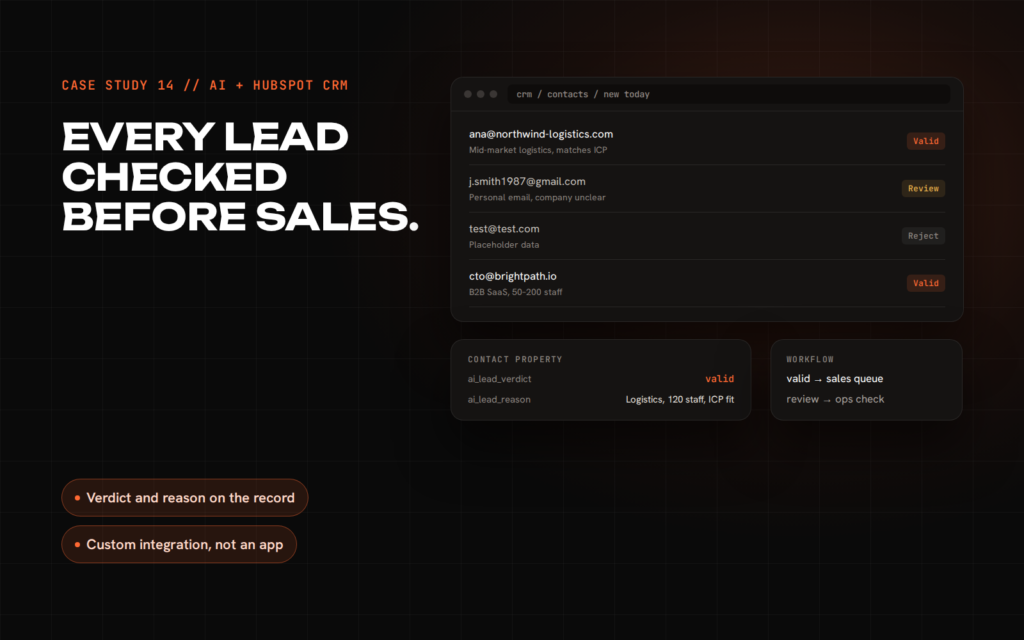
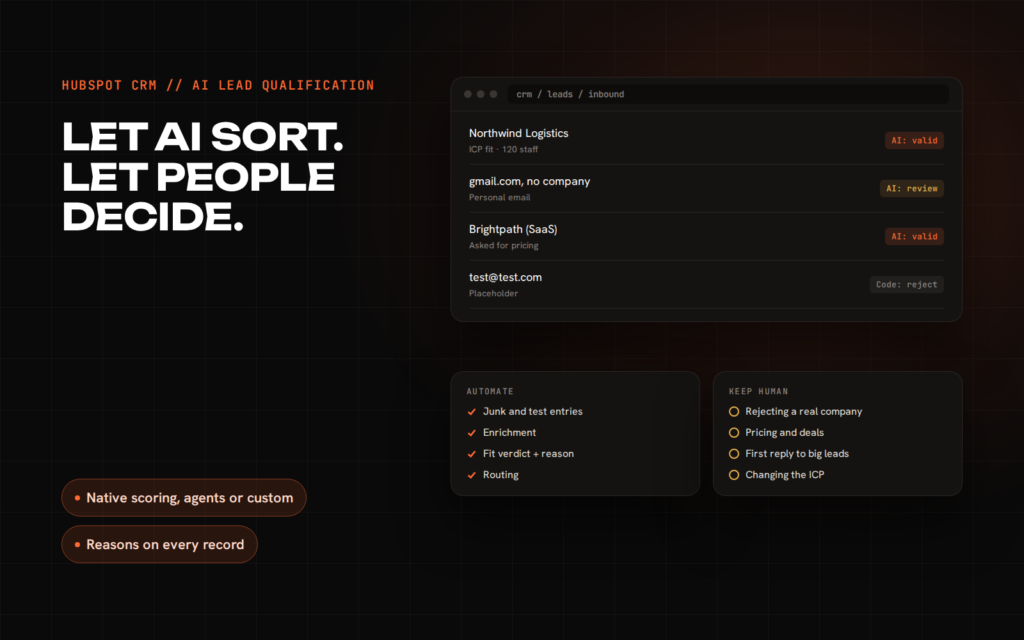
Native tools score and recommend. They are less good at the messy middle: reading what someone actually wrote in a free-text field, checking the company website behind an email domain, or applying rules that only make sense for your business. That is where I built a custom AI lead validator for HubSpot: every new contact is checked on creation, and the integration writes a verdict and a plain-language reason back to the contact record, where normal HubSpot workflows take over.
- Your qualification rules are specific. “Agencies are only a fit if they resell HubSpot” is hard to express as points on a score.
- You need the reason, not just the number. A score of 62 tells a rep nothing. “Logistics company, 120 staff, matches ICP” tells them why.
- You want control over cost and model choice. A custom integration can run cheap code checks first and only call the AI for the cases that need judgement.
- You are not on the tier the native feature needs. Paying for an Enterprise upgrade to get one AI feature can cost more than building it.
What to automate
The rule I use: automate decisions that are cheap to get wrong and easy to reverse. In lead qualification that covers more than people expect.
- Obvious junk. Test entries, placeholder emails and disposable domains. Plain code handles these before any AI is involved.
- Enrichment. Looking up the company behind a domain, its size and what it does.
- Fit classification with a reason. Valid, review or reject, with one sentence explaining why, written to the record.
- Routing. Sending valid leads to the right owner or sequence and questionable ones to a review queue.
- Summaries for the rep. A two-line brief of who the lead is and what they asked for, so the first call starts in the right place.
What to keep human
- Rejecting a real company. AI can flag a lead as a poor fit. A person should decide before a real business is dropped, especially for larger accounts.
- Anything that changes money or contracts. Discounts, pricing exceptions and deal stages stay with people.
- The first personal reply to a high-value lead. Drafts are fine. Sending without a human read is where brand damage happens.
- Changing the rules themselves. The ideal customer profile is a business decision. The AI applies it; it should not quietly redefine it.
One design choice makes all of this work: every AI verdict must be visible and overridable. If a rep can see why a lead was marked and change it in one click, they trust the system and correct it. If they cannot, they ignore it the first time it is wrong.
A setup that works for most teams
- Turn on HubSpot’s fit and engagement scores with the criteria you already know. Keep it simple.
- Add two custom contact properties: an AI verdict and an AI reason.
- Fill them with either a Breeze workflow action or a small custom integration, depending on how specific your rules are.
- Route with ordinary HubSpot workflows based on the verdict, not on the AI directly.
- Review a sample of verdicts every week for the first month and adjust the ideal customer profile, not just the prompt.
If you would like a second opinion on which of these routes fits your portal, I am happy to look at it with you. Book a free 30-minute call, or see how I build AI products and integrations.
Sources: HubSpot KB: lead scoring tool · HubSpot KB: build lead scores with AI · HubSpot: outcome-based pricing for agents · HubSpot: Credits · HubSpot Fall 2026 developer updates